

Easy Flow
フォルダー監視:画像を自動で圧縮 · 変換 · 整理
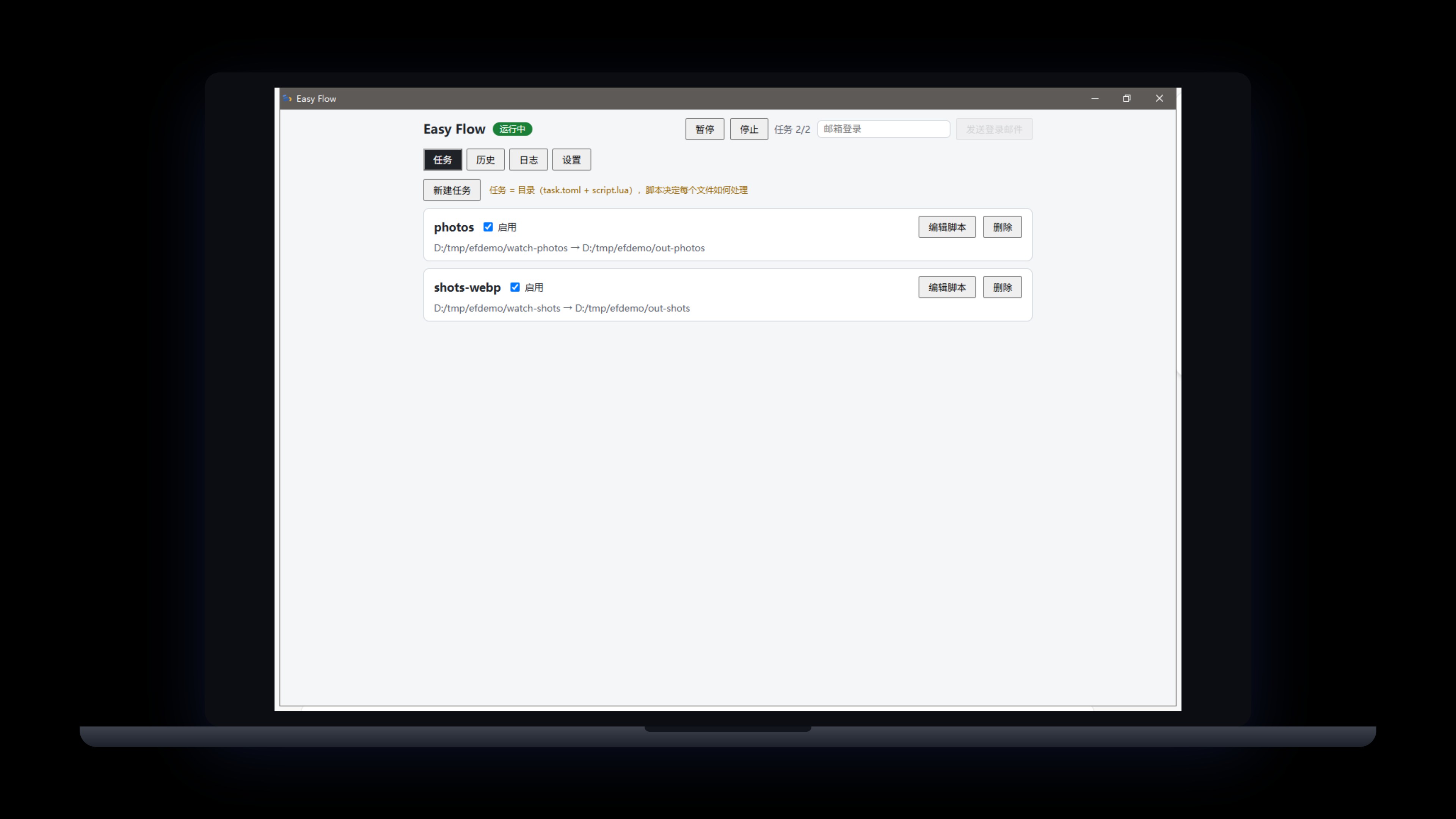
フォルダーを監視し、新しい画像が保存されると自動処理:WebP/AVIF 圧縮は目標サイズを指定でき、EXIF の撮影日・カメラ・向きなどのルールでアーカイブ。処理ロジックは Lua スクリプトで記述し、サンドボックス内で実行。書き込みはすべてエンジンが行います。オリジナルは削除されず(_originals/ に退避、失敗は隔離)、GUI 内で AI がスクリプトを生成、autoflow CLI 付き。
Windows 10/11 · 常駐トレイ · Lua スクリプトタスク · v0.9.4 CLI 付き
 メンバーシップ>
製品一覧に戻る>
メンバーシップ>
製品一覧に戻る>
機能
フォルダーを監視し、新着画像を自動処理
WebP/AVIF 圧縮は目標サイズ指定、超過時は自動で品質調整
撮影日・カメラ・サイズなど任意のルールでアーカイブ
Lua スクリプトはサンドボックス内:ファイル IO なし、スクリプトは意図を記述しエンジンが書き込み
オリジナルは絶対削除しない:_originals/ に退避、失敗は隔離保存
GUI 内で AI がスクリプト生成、autoflow CLI 付き
更新履歴
v0.9.4
2026-09-23
- Login return-to-app now raises the window, both on cold start and while running
- Installer upgrade: deep-link return-to-app no longer breaks after an overwrite install
v0.9.3
2026-09-23
- The Account page now lists your sign-in email, membership badge, subscription start, expiry date and last sync time; lifetime plans show as permanent
- A sign-in prompt appears when you are logged out, and offline-grace status is shown directly on the badge
v0.9.2
2026-09-23
- Install and auto-update are more reliable: stale processes are closed before upgrading and PATH registration no longer hangs the installer
- The installer now follows our unified standard: the publisher shows as Pinnadash and the executable is renamed to easy_flow.exe, so shortcuts point at one program
v0.9.1
2026-09-22
- Settings groups unified as cards, aligned with the company UI standard
- UI layer modernized; About/Account sections now use the company-standard components
v0.9.0
2026-09-20
- Template library reorganized into four categories (Convert & compress / Organize / Selective / Multi-output) with category filters in the New Task dialog
- New "AVIF + WebP dual-format delivery" template: one input produces both AVIF and WebP outputs
- Fixed swallowed engine start failures, false-positive background starts, and 8-hour-off history timestamps; new "Open log folder" in Settings
- Logs now roll daily with crash capture; tray menu redesigned (dual theme, adaptive height)
v0.8.2
2026-09-12
- Tray menu simplified to Pause watching | Preferences... | Quit, consistent across our desktop apps; left-click the tray icon to reopen the main window
v0.8.1
2026-09-12
- Settings gains an Account section: sign-in, plan, expiry, upgrade and sign-out all in one place for a cleaner top bar
- About adds entries for Terms of Service, Privacy Policy, Contact Us and Report a Problem (opened in your browser)
- Fixed the custom title bar not being draggable; settings sections reordered with Account first and About last
v0.8.0
2026-09-12
- Frameless custom title bar: drag the whole top edge to move the window, with new minimize/close buttons that follow the theme
- Tray menu gains a Settings item that opens the main window straight to the Settings page
- Narrower settings sidebar, now consistent across all desktop apps
v0.7.0
2026-09-11
- Settings gain a General tab bundling theme (system/light/dark) and language; top-bar toggles removed
- Theme now follows the system by default with a three-way picker
v0.6.0
2026-09-11
- Sign-in unified with Easy Screenshot & Easy Clipboard: opens the account center in your browser, returning users get back in one click
- Full desktop UI standard compliance: dual themes (follow system), sidebar-style settings, toast feedback
- 11 built-in task templates (WebP/AVIF compression, date/camera organizing, format sorting and more) — one click to create a task
- "Process Now" for existing files, folder-browse pickers, and automatic GIF animation protection
- Bilingual interface (English by default); engine logs localized to English
- CLI adds task templates and task create --template
v0.5.1
2026-09-11
- Check for updates in Settings > About, plus automatic checks at launch
- First-round UI standard compliance fixes
v0.5.0
2026-09-09
- Windows desktop app officially released with direct download
- Unified accounts: magic-link sign-in, 2 tasks free, unlimited with membership
- AI script generation in the GUI; unified Easy-series naming