

Easy Clipboard
Alles Kopierte, griffbereit wiederzufinden
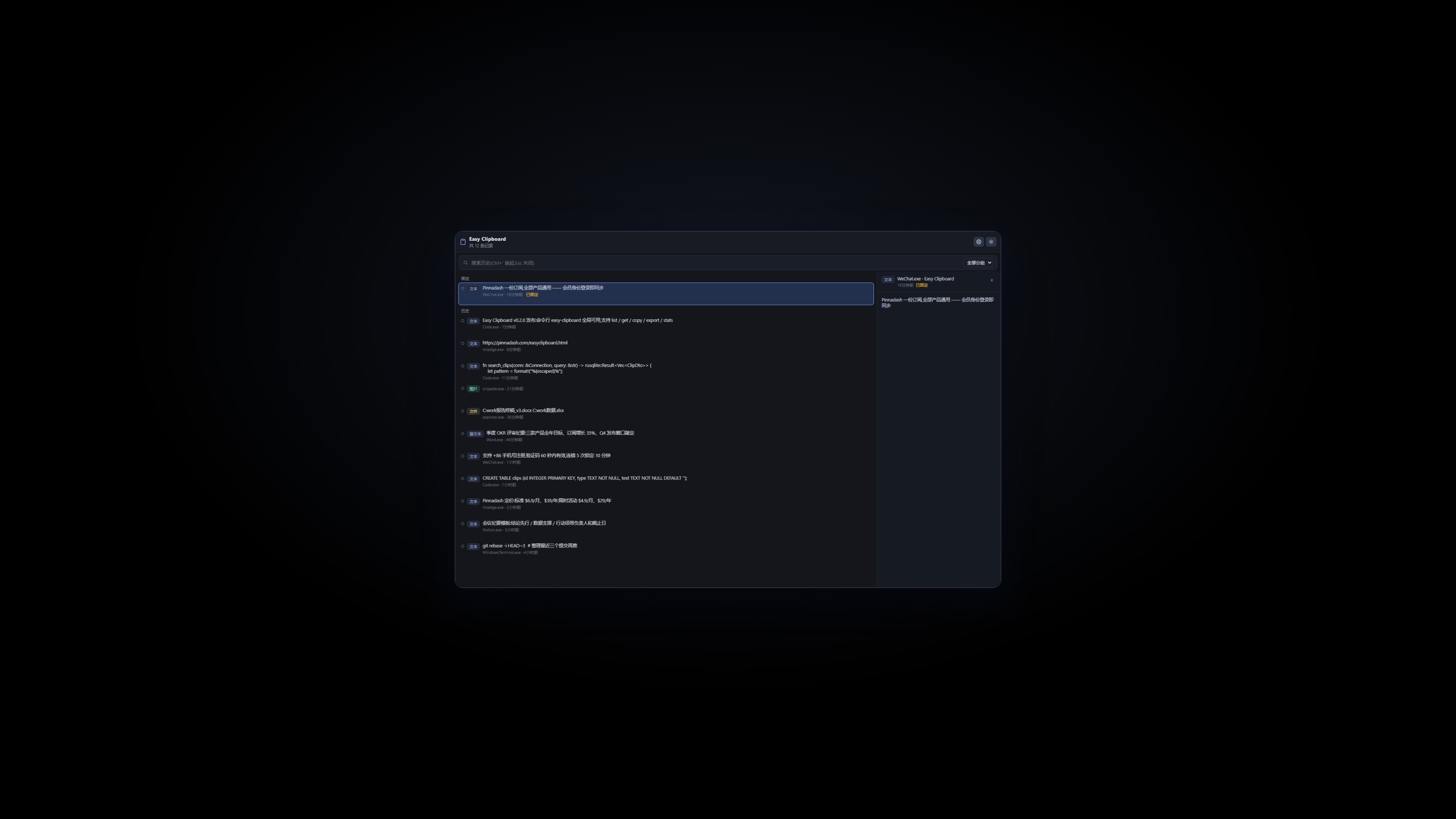
Alles, was du kopierst, landet hier: Text, Rich-Text, Bilder und Dateien werden automatisch erfasst. Per globalem Hotkey eine durchsuchbare Liste aufrufen, Favoriten anpinnen, mehrere Inhalte zusammenführt kopieren und mit einem Tastendruck ins ursprüngliche Fenster einfügen. Alle Daten bleiben lokal, CLI inklusive — Windows 10/11.
Windows 10/11 · im Hintergrund · mit CLI · v0.5.11
 Mitgliedschaft>
Zurück zu den Produkten>
Mitgliedschaft>
Zurück zu den Produkten>
Funktionen
Erfasst automatisch Text, Rich-Text, Bilder und Dateien
Per globalem Hotkey aufrufen, Verlauf sekundenschnell finden
Favoriten anpinnen, mehrere Inhalte zusammengeführt kopieren
Mit einem Tastendruck ins ursprüngliche Fenster einfügen
Alle Daten bleiben lokal — nichts wird hochgeladen
Integrierte easy-clipboard-CLI und SKILL-Datei
Versionshinweise
v0.5.10
2026-09-23
- Returning from the browser now raises the window to the front in one click
v0.5.9
2026-09-23
- Fix: title bar minimize/close buttons were unresponsive (missing window-control permissions since v0.5.0)
- Fix: 'Continue and return to app' deep link broken after overwriting upgrades — installer now self-heals orphaned registry protocol keys
v0.5.8
2026-09-23
- The Account page shows everything at a glance: your sign-in email, membership status, subscription start and expiry dates, last sync time, plus an offline-grace indicator
- When you are signed out, the page now shows a clear sign-in prompt so the entry point is easier to find
v0.5.7
2026-09-23
- Install and auto-update are more reliable: stale processes are closed before upgrading, previously locked component files are released, and PATH registration no longer hangs the installer
- The installer now follows our unified standard: the publisher shows as Pinnadash and the executable name is normalized
v0.5.6
2026-09-22
- Settings groups now render as cards, visually consistent with About/Account
v0.5.2
2026-09-14
- Tray menu blank-space fix: the menu card height now adapts to its content in real time, eliminating the extra blank area at the bottom; popup positioning is more stable.
v0.5.1
2026-09-14
- The quick-list panel gains a search box: focused on open, filters as you type (matching both clip content and source app), with number-key quick paste working on results too; quick paste keys 1-9 are now limited to the first 9 items, and items beyond the 10th no longer show a number badge.
v0.5.0
2026-09-14
- Refreshed tray menu: the right-click menu is now a custom rounded card (white, roomy spacing, line icons, following system light/dark theme), with a new Preferences entry to the settings page and live language sync; the window title bar gains minimize and close buttons — closing hides the app to the tray.
v0.4.1
2026-09-12
- Fixed auto-update stalling forever when WebView2Loader.dll was locked by another program: the installer now renames the locked file aside before overwriting, so updates complete without any intervention
v0.4.0
2026-09-12
- AI now supports the Anthropic Messages protocol (choose it in Settings → AI) for broader relay compatibility.
- Better AI failure logs and error hints; bare-domain API URLs now auto-append /v1.
- Disabled the system context menu in the quick list and sequential-paste bar.
v0.3.0
2026-09-11
- Settings now open as a full in-app page instead of a dialog, covering General/Records/Hotkeys/Groups/Data/Account
v0.2.5
2026-09-11
- Redesigned account page: one-click sign-in when logged out; full subscription details (plan, start date, expiry) once signed in
- New Manage subscription shortcut to the account portal
v0.2.4
2026-09-11
- Settings page gains a Check for updates entry; update checks also run automatically at launch
- First-round UI standard compliance fixes
v0.2.3
2026-09-09
- Fixed sign-in callback: the app now updates to signed-in state right after account center login
v0.2.1
2026-09-08
- Default language switched to English; existing Chinese preference preserved
- Account section fully bilingual
v0.2.0
2026-09-07
- easy-clipboard CLI and SKILL file shipped with the installer
- Account integration with easyclipboard:// deep link sign-in
- Per-machine install; fixed installer broadcast freeze